
Project tree
Once logged in, “My Projects” page is open displaying a projects tree: the Projects and Subprojects you have been assigned to.
Projects are the primary business object for organizing and manage your quality assurance work. They serve as the highest hierarchical elements structuring Subprojects, Test Suites, Test Cases and Test Runs.
The tree view displays the (sub)project title, ID, status, the number of test suites, and the number of test runs, broken down by status (open and in progress / closed).
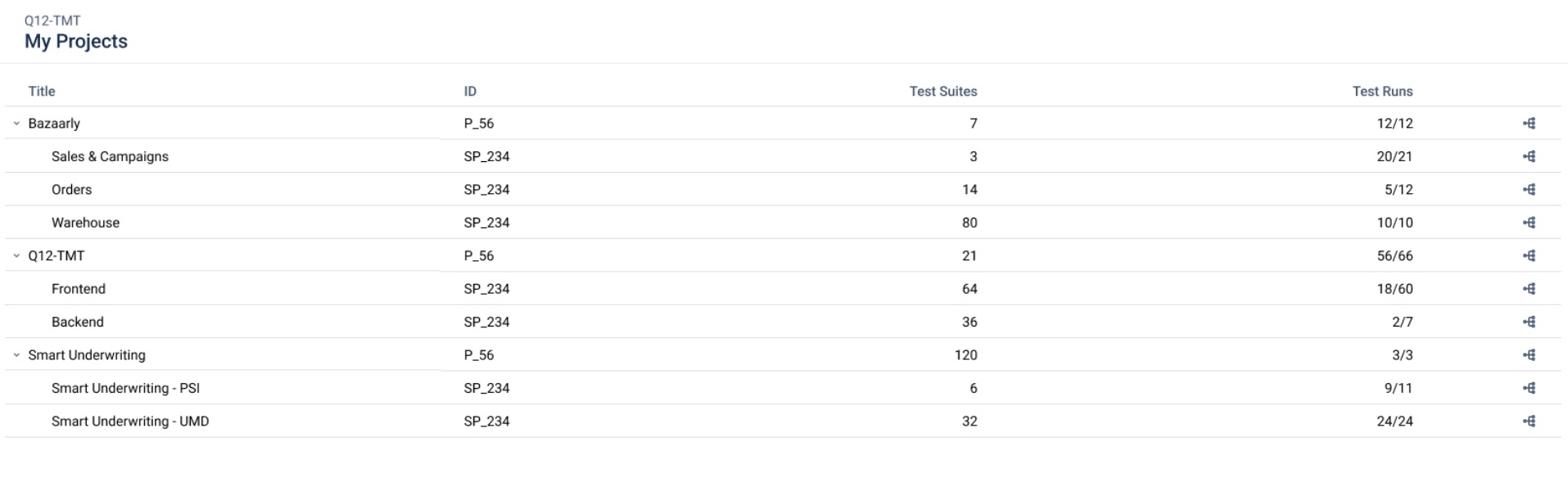
Click on a Project to open it in the latest Version. To select a different Version, click on the version icon  at the end of a row.
After selecting a (Sub)Project and a Version, you will be taken to the list of all Test Suites.

If your Project is not in the list, please contact the administrator to provide the corresponding permissions.
Creating a new Version is only available in the Q12-TMT application and with the role of a Test manager or higher.